


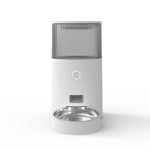
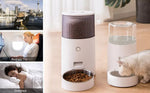

Intelligent Pet Feeder 2.5L - App Control Smart Feeder with Stainless Steel Bowl
SKU: SMZN045
The DUDU Pet Smart Feeder - App Control with Ultra-Low Power!
Keep your cat or small dog perfectly fed with this intelligent 2.5L pet feeder featuring advanced app control, scientific feeding schedules, and a hygienic stainless steel bowl! Designed for modern pet parents who want precision and convenience, this smart automatic feeder ensures your pet gets the right amount of food at the right time—whether you're at home, at work, or traveling. With ultra-low power consumption and reliable performance, this is the ultimate feeding solution for cats and small dogs!
Why Pet Owners Love This Intelligent Feeder:
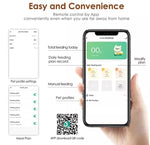
- 📱 APP Control Smart Feeding â€?Control feeding schedules, portion sizes, and monitor your pet's meals from anywhere using your smartphone (iOS & Android compatible)
- �Scientific Fixed Time & Quantitative Feeding �Set precise feeding times and exact portions to maintain your pet's healthy eating routine automatically
- 🥣 Stainless Steel Bowl â€?Hygienic, rust-resistant stainless steel bowl is safer and cleaner than plastic—easy to wash and dishwasher-safe
- 🍽ï¸?2.5L Capacity â€?Holds up to 2.5 liters (approximately 10 cups) of dry food—perfect for cats and small dogs without constant refilling
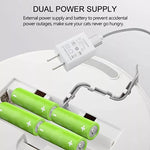
- �Ultra-Low Power Consumption �Energy-efficient design means worry-free, burden-free operation with minimal electricity usage
- 🎯 Precise Portion Control â€?Dispenses exact portions to prevent overfeeding and support healthy weight management
- 🐾 Perfect for Cats & Small Dogs â€?Ideal size and portions for cats and small dog breeds
- 💪 Durable & Reliable â€?High-quality construction built to last through years of daily use
- 🧼 Easy to Clean â€?Removable stainless steel bowl and detachable parts make cleaning quick and hassle-free
- �Peace of Mind �Your pet gets fed on time with perfect portions, even when you're not home
Perfect For:
- Cats and small dogs who eat dry food
- Busy professionals who can't be home at feeding times
- Frequent travelers who need reliable automatic feeding
- Pets who need portion control or weight management
- Maintaining consistent feeding schedules for optimal pet health
- Pet parents who want hygienic stainless steel feeding bowls
- Scientific feeding with precise timing and portions
- Energy-conscious pet owners seeking low power consumption
Product Specifications:
- Brand: DUDU Pet
- Capacity: 2.5 liters (approximately 10 cups of dry food)
- Bowl Material: Stainless steel (hygienic, rust-resistant, dishwasher-safe)
- Color: Pure White (clean, modern design)
- Control: Smartphone app (iOS & Android compatible)
- Feeding: Scientific fixed time and quantitative portions
- Power: Ultra-low power consumption for worry-free operation
- Food Type: Dry kibble (5-15mm diameter recommended)
- Suitable for: Cats and small dogs
- Features: App control, precise timing, portion control, stainless steel bowl
How to Use:
1. Download App: Install the DUDU Pet app on your smartphone (iOS or Android)
2. Setup: Connect the feeder to the app following the simple pairing instructions
3. Fill: Add up to 2.5 liters of dry kibble to the food hopper
4. Program: Use the app to set precise feeding times and exact portion sizes
5. Monitor: Track feeding history and adjust schedules as needed through the app
6. Automatic Feeding: The feeder will automatically dispense food into the stainless steel bowl at your programmed times!
💡 Pro Tip: Start by measuring your pet's daily food requirement and divide it into 2-3 smaller meals throughout the day. Use the app's quantitative feeding feature to dispense exact portions for optimal weight management!
Key Benefits:
- �Scientific Feeding: Fixed time and quantitative portions for optimal pet health
- �Hygiene: Stainless steel bowl is cleaner and safer than plastic alternatives
- �Convenience: App control from anywhere in the world
- �Energy Efficient: Ultra-low power consumption saves electricity
- �Precision: Exact portions prevent overfeeding and waste
- �Reliability: Consistent feeding even when you're away
🧼 Cleaning Instructions:
1. Remove all food from the feeder
2. Remove the stainless steel bowl and wash with warm soapy water or place in dishwasher
3. Wipe the food hopper and dispenser with a damp cloth
4. Wipe the base unit with a damp cloth (do not immerse in water)
5. Dry all parts completely before reassembling
6. Clean the stainless steel bowl after each use for optimal hygiene
🥣 Stainless Steel Bowl Benefits: Unlike plastic bowls, stainless steel doesn't harbor bacteria, is scratch-resistant, won't retain odors, and is much easier to keep clean. It's the healthier choice for your pet!
📱 App Features:
- Remote feeding control from anywhere
- Customizable feeding schedules
- Precise portion size adjustment
- Feeding history tracking
- Real-time notifications
- Easy-to-use interface
🍖 Food Recommendations: Works best with dry kibble sized 5-15mm in diameter. Not suitable for wet food, semi-moist food, or very small/large kibble sizes. The 2.5L capacity is perfect for cats and small dogs!
âš?Ultra-Low Power Consumption: The energy-efficient design means you can run this feeder continuously without worrying about high electricity bills. It's worry-free and burden-free operation!
Give your cat or small dog the gift of scientific, precise feeding with intelligent app control and hygienic stainless steel—order now and enjoy worry-free feeding! 🐱🐕âœ?/p>
For Physical Products (المنتجات المادية)
The products are delivered using companies specialized in delivering orders within the United Arab Emirates within a period not exceeding five working days, without calculating official holidays and vacations, according to the policies of the shipping companies.
In the event that the order reaches the address specified by you and it is not possible to receive it, please contact our customer service to set another date for the delivery of the order. We disclaim any responsibility for any order that has not been delivered within 30 days from the date of the order.
Official working days are from Sunday to Thursday. Delivery is not available on Fridays and public holidays.
For international orders, the package will be delivered within 15 days.
للمنتجات المادية
يتم توصيل المنتجات باستخدام شركات متخصصة في توصيل الطلبات داخل دولة الإمارات العربية المتحدة خلال فترة لا تتجاوز خمسة أيام عمل، بدون احتساب العطل والإجازات الرسمية، وذلك حسب سياسات شركات الشحن.
في حال وصول الطلب إلى العنوان المحدد من قبلك وتعذر استلامه، يرجى التواصل مع خدمة العملاء لدينا لتحديد موعد آخر لتسليم الطلب. نحن نخلي مسؤوليتنا عن أي طلب لم يتم تسليمه خلال 30 يومًا من تاريخ الطلب.
أيام العمل الرسمية من الأحد إلى الخميس. لا يتوفر التوصيل يوم الجمعة والعطلات الرسمية.
This Return & Refund Policy applies to all business customers purchasing via Epet.ae. All returns require prior RMA (Return Merchandise Authorization) approval. By using our services, you agree to the terms outlined below.
1. Preferred Resolution Order
When a return is approved, we will provide remedies in the following order of preference:
- Exchange: Replacement with an equal-value product (same or alternative brand).
- Account Credit: Credit issued to your Epet.ae account for future purchases.
- Refund: Refund to the original payment method, issued after inspection and approval of the returned items.
2. RMA Process
- Submit Request: Email us at contact@epet.ae with the subject line "RMA Request – [Your Order Number]". Please include your order number, product SKU(s), quantity, reason for return, and supporting photos or videos.
- Review & Authorization: Our team will review your request. If approved, we will issue an RMA number and provide return instructions and the shipping address. Returns shipped without prior RMA authorization will not be accepted.
- Return Shipment: Ship the items back to us according to the provided instructions. Products must be in their original, resalable condition.
- Inspection & Resolution: Upon receipt and inspection of the returned goods, we will process the agreed-upon resolution (exchange, account credit, or refund) within [e.g., 5-10] business days.
3. Shipping & Fees
- Epet.ae Error: If the return is a result of our error (e.g., wrong item shipped, defective product, shipping damage), Epet.ae will cover the costs of return and replacement shipping.
- Non-Quality Related Returns: For returns due to buyer's remorse or incorrect ordering (subject to approval), the customer is responsible for return shipping costs. A restocking fee of up to 10% may apply.
- Non-Returnable Items: For health and safety reasons, perishable goods, opened products, or personalized items are generally non-returnable unless deemed defective.
4. Account Credit Terms
- Credits issued to your Epet.ae account are valid for 12 months from the issuance date.
- Credits are non-transferable and can only be used for purchases on Epet.ae. They are not redeemable for cash.
5. Final Decision
- Epet.ae reserves the right to make the final decision regarding the approval of any return and the appropriate resolution method.
- This policy may be updated periodically. The latest version will always be available on the Epet.ae website.
If you have any questions about this policy, please contact us atcontact@epet.ae .
Recently Viewed Products